How This Site Was Built With Claude Code
Contents
- The stack
- CLAUDE.md: the operating manual
- Auto-memory: how Claude learns your preferences
- The skills system: structured AI workflows
- Multi-agent development with Gastown
- Git worktrees: parallel without conflict
- The Mac Mini setup
- Smoke tests without a framework
- Structured data and SEO: no plugins needed
- Typst for PDF generation
- Context7: live documentation in the AI's context
- Playwright for browser automation
- What the workflow actually looks like
- UX features: the details that add up
- Tips and tricks
- Want to build your own? Here's the prompt.
- Credit where it's due
- The meta layer
This post was generated by Claude Code (Opus 4.6). The prompts, structure, and editorial direction are mine. The drafting, code examples, and formatting are the model's. I reviewed and approved everything, but I want to be upfront about how it was made. That's kind of the whole point.
I've been building this site with Claude Code for a few weeks now. Not "assisted by" in the vague Copilot sense. I mean the entire thing: architecture decisions, server code, blog posts, CV layout, smoke tests, structured data, deployment config. Claude Code is the builder. I'm the PM.
This post is a full breakdown of how that works in practice. Every tool, every workflow, every trick I've picked up. If you're curious about what AI-native development actually looks like when you commit to it, this is the honest version.
#The stack
The site is a Node monolith. One file, server.js, around 1,000 lines. No framework. No React, no Next.js, no Gatsby. Just Node's built-in HTTP server, the marked library for markdown parsing, and a content/posts/ directory full of .md files.
It wasn't always this simple. The site used to run on Gatsby, which is a static site generator built on React and GraphQL. Gatsby was fine when I set it up, but it had become a mass of build configs, GraphQL queries, and plugin dependencies for what is fundamentally a personal website with some blog posts and a photo gallery.
Claude Code ripped out the entire Gatsby setup and replaced it with a single server file. The migration happened in one session. I described what I wanted ("server-rendered, no framework, markdown content, same routes") and Claude wrote the whole thing. The legacy Gatsby code still sits in legacy/gatsby/ if you want to compare.
Every route is server-rendered. Blog posts, writing, projects, photos, the about page, even the RSS feed. The server reads markdown files, parses frontmatter, renders HTML, and serves it. That's it.
#CLAUDE.md: the operating manual
This is the most important file in the repo and it's not code.
CLAUDE.md is a markdown file that sits in the project root and tells Claude Code how to behave. Think of it as a system prompt, but for your entire project. Claude reads it at the start of every session. Here's what mine looks like (abbreviated):
# CLAUDE.md

## Repo Mission
Serve yashgadodia.com — a personal website built as a Node monolith
(server.js) with markdown content in content/posts/*.md.

## Architecture
- Runtime: server.js (Node + marked). No framework.
- Content: content/posts/*.md is source of truth for all writing.
- Static assets: public/ holds only static files (CSS, images, favicons).
- Deploy: Railway (railway.json).

## Tone & Copy
- Calm, direct, slightly opinionated. No marketing language or buzzwords.
- British English.
- Short paragraphs, simple sentences.
- Do not invent achievements or exaggerate.

## Navigation (non-negotiable)
Sidebar and top nav must be consistent across all routes.
Entries: Blog, Projects, About Me, Writing, Photos.

## Coding Standards
- Prefer deterministic server fixes over patching compiled output.
- Preserve path traversal protections in file-serving logic.
- Support GET and HEAD only unless endpoint explicitly needs more.
- Avoid heavy dependencies when Node core is enough.

## Pre-merge Checks
1. npm run check:routes passes.
2. /blog/ excludes personal posts, /writing/ includes them.
3. /rss.xml returns valid XML.
The key insight: the more specific your CLAUDE.md, the less you have to repeat yourself. I spent time upfront defining the tone, the route rules, the navigation structure, what categories map where. Now I can say "write a blog post about X" and Claude already knows the voice, the formatting, the frontmatter schema, and where to put it.
The (non-negotiable) markers matter. Without them, Claude will sometimes "improve" things you didn't ask it to touch. Marking constraints as non-negotiable tells it: this is load-bearing, don't optimise it away.
#Auto-memory: how Claude learns your preferences
Claude Code has a persistent memory system. Mine lives in .claude/projects/memory/ and includes files like MEMORY.md and writing-style.md. These persist across sessions.
My writing style guide, for example:
## Voice
- First person, conversational. Writes like he's explaining
  something to a friend who happens to be technical.
- Contractions everywhere. "I've", "It's", "doesn't". Never stiff.

## What to avoid
- Em dashes. Use commas, full stops, colons, or restructure instead.
- Marketing language, buzzwords, slogans.
- Parallel rhetorical constructions stacked together.
- Dramatic one-liner closers after paragraphs.
This means Claude doesn't start from zero each session. It knows I prefer British English, that I hate em dashes, that I reference my own past posts inline rather than in "see also" blocks. Over time, the memory files become a detailed profile of how I work.
When Claude gets something wrong and I correct it, the correction gets saved to memory so it doesn't repeat the mistake. When I say "always do X", it persists. The compound effect is significant: sessions in week three are noticeably smoother than sessions in week one.
#The skills system: structured AI workflows
Raw Claude Code is powerful but chaotic. Left to its own devices, it'll jump straight to writing code without thinking through the design. The skills system (from the Superpowers plugin ecosystem) adds structured workflows.
The ones I use most:
Brainstorming. Before any feature work, Claude runs through a structured design process: explore project context, ask clarifying questions one at a time, propose 2-3 approaches with trade-offs, present a design for approval, write a spec document. Only after I approve the spec does it move to implementation.
Test-driven development. Write tests first, then implement. Claude won't touch implementation code until failing tests exist.
Code review. After completing a feature, a separate review agent checks the work against the original plan and coding standards.
Verification before completion. Before Claude claims anything is "done", it has to run verification commands and confirm the output. No "I've fixed the bug" without evidence.
The flow looks like this:
brainstorm → write spec → write plan → implement (TDD) → code review → verify
Each step is a gate. Claude can't skip ahead. This is the difference between "AI that writes code" and "AI that ships software." The discipline comes from the workflow, not the model.
#Multi-agent development with Gastown
This is where it gets interesting.
Gastown is Steve Yegge's multi-agent orchestration system for Claude Code. The concept: instead of one Claude session doing everything sequentially, you run multiple agents in parallel, each working on a different task in an isolated git worktree.
The architecture has a few key pieces:
- The Mayor: your primary Claude Code instance that coordinates everything. You tell the Mayor what you want built, and it decomposes the work.
- Polecats: worker agents with persistent identity but ephemeral sessions. They get spawned for specific tasks, do their work in isolated git worktrees, and their identity and history persist even after the session ends.
- Hooks: git-backed persistent storage for agent work state. If an agent crashes or a session ends, work isn't lost.
- Convoys: work tracking units that bundle related tasks and assign them to agents.
In practice, this means I can have one agent working on a new blog post, another refactoring the server's routing logic, and a third updating the smoke test suite, all at the same time, in separate worktrees, without stepping on each other.
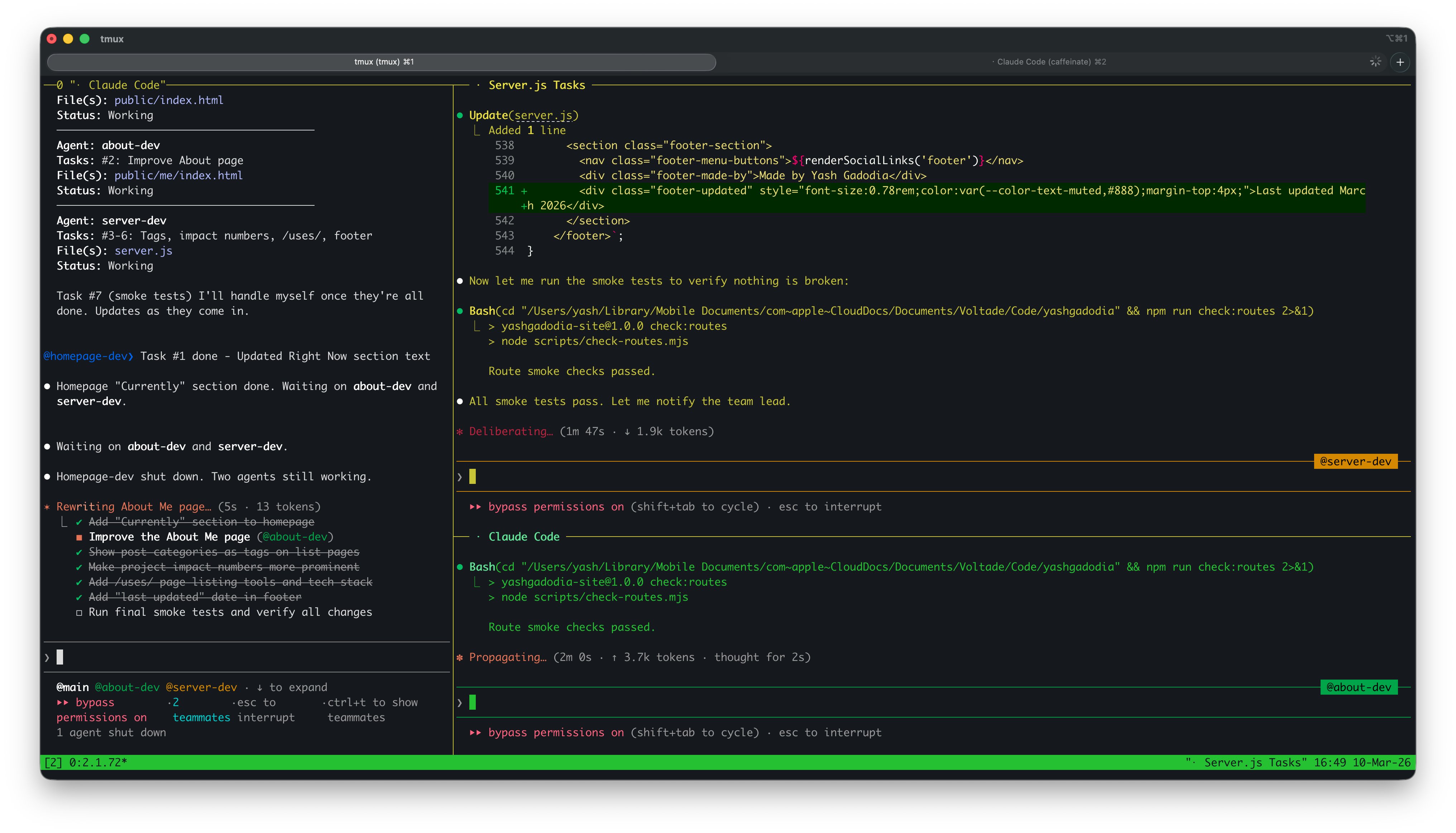
Three agents working simultaneously. The Mayor (left) coordinates while @about-dev and @server-dev (right) edit code and run tests. Notice the task checklist items being crossed off in real time.
And here's what it looks like in motion:
The tmux setup is straightforward: each pane is a separate Claude Code session attached to a different Gastown agent. I can watch them all work in real time. When one finishes, the Mayor picks up the result and coordinates the merge.
#Git worktrees: parallel without conflict
Git worktrees are the mechanism that makes multi-agent work possible. A worktree is a separate working directory linked to the same repository but checked out on a different branch. Each agent gets its own worktree, so they can all edit files simultaneously without merge conflicts.
Claude Code has native worktree support. You can spawn a subagent with isolation: "worktree" and it gets a fresh copy of the repo to work in. When it's done, changes come back as a branch ready to merge.
My repo already has worktrees in .claude/worktrees/. They get created and cleaned up automatically as agents spin up and finish tasks. It's the closest thing to giving each AI its own desk.
#The Mac Mini setup
I wrote about this in The Death of SaaS: at Voltade, we bought everyone a Mac Mini and put them on Claude Max. The Mac Mini is always on, sitting in the office, connected to the network.
This matters for agent workflows because agents need a persistent runtime. My OpenClaw agents (Clawrence and Claudia) run on the Mac Mini 24/7. Clawrence monitors for new Claude features, scrapes government tenders, and posts daily briefs. Claudia manages customer WhatsApp groups and creates Notion tickets.
But the Mac Mini also serves as a remote development machine. I SSH in, attach to a tmux session, and have Claude Code running with full project context. Long-running tasks (like a comprehensive site redesign) can run overnight. I check back in the morning and review what was done.
The combination of Gastown's multi-agent orchestration, tmux for session persistence, and the Mac Mini as always-on infrastructure means I can kick off parallel agent work, close my laptop, and come back to completed branches ready for review.
#Smoke tests without a framework
No Jest, no Mocha, no testing framework at all. The smoke test suite is a single script (scripts/check-routes.mjs) that hits every route and validates the response. It checks:
- HTTP status codes for all defined routes
- Content-type headers
- That blog posts render with expected content
- That structured data (JSON-LD) is present and valid
- That the sitemap and RSS feed return valid XML
- That redirects work correctly (
/notes/→/writing/)
npm run check:routes
One command, runs in seconds, catches regressions. Claude Code runs this before every commit. No configuration, no test runners, no assertion libraries. Just fetch and check.
#Structured data and SEO: no plugins needed
The site generates JSON-LD structured data on every page. Person schema on the homepage, Article schema on blog posts, with OpenGraph tags for social sharing. All server-rendered, no client-side JavaScript.
There's also a programmatic sitemap (/sitemap.xml), an RSS feed (/rss.xml), and proper robots.txt. These are things that Gatsby needed plugins for. In a Node monolith, they're just routes that return XML.
Claude Code set all of this up. I said "add structured data and SEO basics" and it wrote the JSON-LD templates, the sitemap generator, and the RSS builder. The smoke tests verify they're valid on every run.
#Typst for PDF generation
The site has a downloadable PDF document generated from Typst, a modern typesetting language. Think LaTeX but actually pleasant to use. The source is a .typ file that compiles to PDF via CLI:
typst compile cv/cv.typ public/cv.pdf
There's a pre-commit hook that auto-compiles the PDF whenever the Typst source is staged. So the PDF is always in sync with the source, and I never have to remember to run the compile step manually.
Claude Code writes and edits the Typst source directly. It understands Typst's syntax well enough to make layout changes, adjust spacing, and restructure content without breaking the compilation.
#Context7: live documentation in the AI's context
One of the MCP (Model Context Protocol) servers I use is Context7. It pulls up-to-date documentation for any library directly into Claude's context window during development.
When Claude needs to use a library it's unsure about, it can query Context7 for the latest docs instead of relying on its training data (which has a knowledge cutoff). This is especially useful for fast-moving tools like Typst, where the API changes between versions.
#Playwright for browser automation
The repo includes a Playwright-based export script for generating assets from the rendered site. Playwright is also available as an MCP server, which means Claude Code can navigate the live site, take screenshots, fill forms, and validate visual output as part of its workflow.
I've used this for checking that pages render correctly after changes, generating screenshots for documentation, and exporting content from the browser-rendered version.
#What the workflow actually looks like
Here's a concrete example. Me adding this very blog post:
Step 1: I describe what I want. "Write a blog post about how this site was built with Claude Code. Share prompts, strategies, technical details. Mark it as AI-generated at the top."
Step 2: Claude brainstorms. It explores the project context (reads existing posts, checks the repo structure, reviews CLAUDE.md), then asks clarifying questions one at a time. "What's Gastown?" "Where will the video be hosted?" "What level of detail on prompts?"
Step 3: I provide direction. I share links, clarify terminology, tell it what to emphasise and what to leave out. The AI proposes, I decide.
Step 4: Claude writes. It creates the markdown file with proper frontmatter, follows the writing style guide from memory, cross-references existing posts, and uses the tone defined in CLAUDE.md.
Step 5: Verification. Claude restarts the dev server, runs the smoke tests, checks that the new post appears on /blog/ with the correct metadata.
The whole cycle is maybe 20 minutes. Most of that time is me thinking about what I want, not typing or coding.
#UX features: the details that add up
The site has a layer of interactive polish that Claude Code built across several sessions. None of it is essential, but together it makes the site feel considered:
- Command palette (press
Cmd+K). Search for any page, blog post, or action. Keyboard-navigable. Inspired by tools like Linear and Raycast. - Keyboard shortcuts throughout.
J/Kto navigate post lists,Tto toggle theme,?for the shortcuts modal.Escapecloses any overlay. - Code block copy buttons. Every
<pre>block gets a one-click copy button. No library, just vanilla JS. - Image lightbox. Click any image in a blog post to see it full-screen. Click or press Escape to close.
- Scroll-to-top button. Appears after scrolling down on long pages. Smooth-scrolls back to top.
- External link indicators. Links that leave the site get a subtle arrow icon via CSS pseudo-elements.
- Reading progress bar. A thin bar at the top of blog posts showing how far you've scrolled.
- Table of contents. Auto-generated from headings, collapsible, with heading anchor links.
- Time-aware greeting. The homepage says "Good morning", "Good afternoon", or "Good evening" based on your local time.
There are also hidden routes: /colophon/ (how the site is built), /uses/ (my hardware and tools), and /humans.txt (an old-web nod). These are only discoverable through the command palette or by URL.
Every feature was built by Claude Code from a single prompt, tested with Playwright at multiple viewport sizes, and regression-checked by the smoke test suite. The whole UX layer is about 500 lines of vanilla JS, zero dependencies.
#Tips and tricks
Things I've learned the hard way:
Be specific in CLAUDE.md. Vague instructions get vague results. "Write good code" means nothing. "Avoid heavy dependencies when Node core is enough" means something.
Mark constraints as non-negotiable. If there's something Claude should never change, say so explicitly. Otherwise it will "improve" it.
Use memory for corrections. When Claude gets something wrong, don't just fix it in the moment. Save the correction to auto-memory so it sticks across sessions.
Structure beats intelligence. The skills workflow (brainstorm → spec → plan → implement → review → verify) produces better results than letting a smarter model freestyle. Discipline is a multiplier.
Git worktrees for parallelism. If you're only running one Claude session at a time, you're leaving performance on the table. Gastown + tmux + worktrees lets you run 4-10 agents simultaneously.
Always-on infrastructure matters. A Mac Mini running 24/7 with tmux sessions means agents can work while you sleep. Check in the morning, review the branches, merge what's good.
Pre-commit hooks for consistency. Automate the things you'll forget. My Typst-to-PDF compilation happens on every commit without me thinking about it.
Let Claude read before it writes. The worst AI output comes from generating code without reading the existing codebase first. Claude Code's tools (Read, Grep, Glob) exist for a reason. The CLAUDE.md instruction "do not propose changes to code you haven't read" is load-bearing.
#Want to build your own? Here's the prompt.
If you have Claude Code (or any capable AI coding agent), you can build a site like this from scratch. Here's the prompt I'd give if I were starting over:
Build me a personal website. Here are the requirements:

- Node.js server, single file (server.js), no framework. Use the marked
  library for markdown parsing.
- Blog posts live in content/posts/*.md with YAML frontmatter
  (title, date, slug, description, categories).
- Server-rendered routes: /, /blog/, /writing/, /projects/, /about/.
- /blog/ shows posts with category "Technical".
  /writing/ shows posts with category "Personal" or "Writing".
- RSS feed at /rss.xml, sitemap at /sitemap.xml.
- Static assets served from public/.
- Clean, minimal design. Dark mode support. Sidebar navigation.
- Deploy-ready for Railway (or any Node host).
- Include a smoke test script that hits every route and checks status codes.

Create a CLAUDE.md with the architecture, route rules, tone guide
(calm, direct, no marketing language), and coding standards.
Start the server and verify all routes work.
That's it. One prompt, one session, and you have a working personal site. Everything after that is iteration: writing posts, tweaking the design, adding features. The CLAUDE.md grows with the project, and Claude Code gets better at working with your codebase over time.
#Credit where it's due
The design and structure of this site were originally inspired by Tania Rascia's site. Her clean, content-first approach to personal sites was the starting point. The original version of this site was a fork of her Gatsby setup, and while the stack has changed completely (Gatsby → Node monolith, static → server-rendered), the philosophy remains: simple, readable, no bloat. Thanks, Tania.
#The meta layer
There's something recursive about this post. It's a blog post about how Claude Code builds this site, written by Claude Code, on a site built by Claude Code. The AI is documenting its own workflow.
But that's exactly the point. The value isn't the model's writing ability or coding ability in isolation. It's the system around it: the CLAUDE.md that encodes project knowledge, the memory files that accumulate preferences, the skills that enforce discipline, the multi-agent setup that enables parallelism, and the always-on infrastructure that makes it persistent.
I'm not a developer who uses AI tools. I'm a PM who treats AI as the engineering team.