Clawrence and Claudia: Building AI Agents That Actually Do Things
Contents
I wrote on LinkedIn a few weeks ago about setting up my first OpenClaw agent and having this realisation: the value isn't the model, it's the integrations and access. A standalone chatbot is interesting. An agent embedded in your actual workflows with memory and context is a completely different thing.
Since then I've gone deeper. I now run two agents at Voltade, and they've changed how we operate more than I expected.
#How OpenClaw actually works
Worth a quick explanation for anyone unfamiliar. OpenClaw is an open-source agent runtime that runs on your own machine. The architecture is straightforward: a Gateway daemon listens for inbound messages from connected channels (Telegram, WhatsApp, Slack, whatever). When a message arrives, the Gateway routes it to an agent session. The agent reads your configured files and memory, packs them into a system prompt, sends that to whatever LLM you've pointed it at, and routes the response back through the originating channel.
The intelligence comes entirely from the LLM. OpenClaw itself is just the routing layer, the memory layer, and the scheduler. That's what makes it flexible. You can swap models, add skills, connect new channels, and the core stays the same.
It's also become massive. Surpassed React as the most-starred project on GitHub. But the interesting part isn't the platform itself, it's what you can build on top of it.
#Claudia: our customer success manager
Claudia is our external-facing agent. She lives in all our WhatsApp groups with customers.
What she does:
- Synthesises customer feedback from group chats and persists them in a database
- Sends a daily morning brief with overnight activity across all 28 customer groups
- Chases us when we haven't gotten back to a customer
- Handles tier 1 support questions
- Creates tickets on our Notion kanban board when something needs action
The tier 1 support bit was the interesting part. I exported our full WhatsApp chat history (with permissions from our customers) and gave Claudia access to it. So she's trained on how we've answered questions before, what our common issues are, what the usual fixes look like. She doesn't just summarise. She can actually respond to the straightforward stuff.
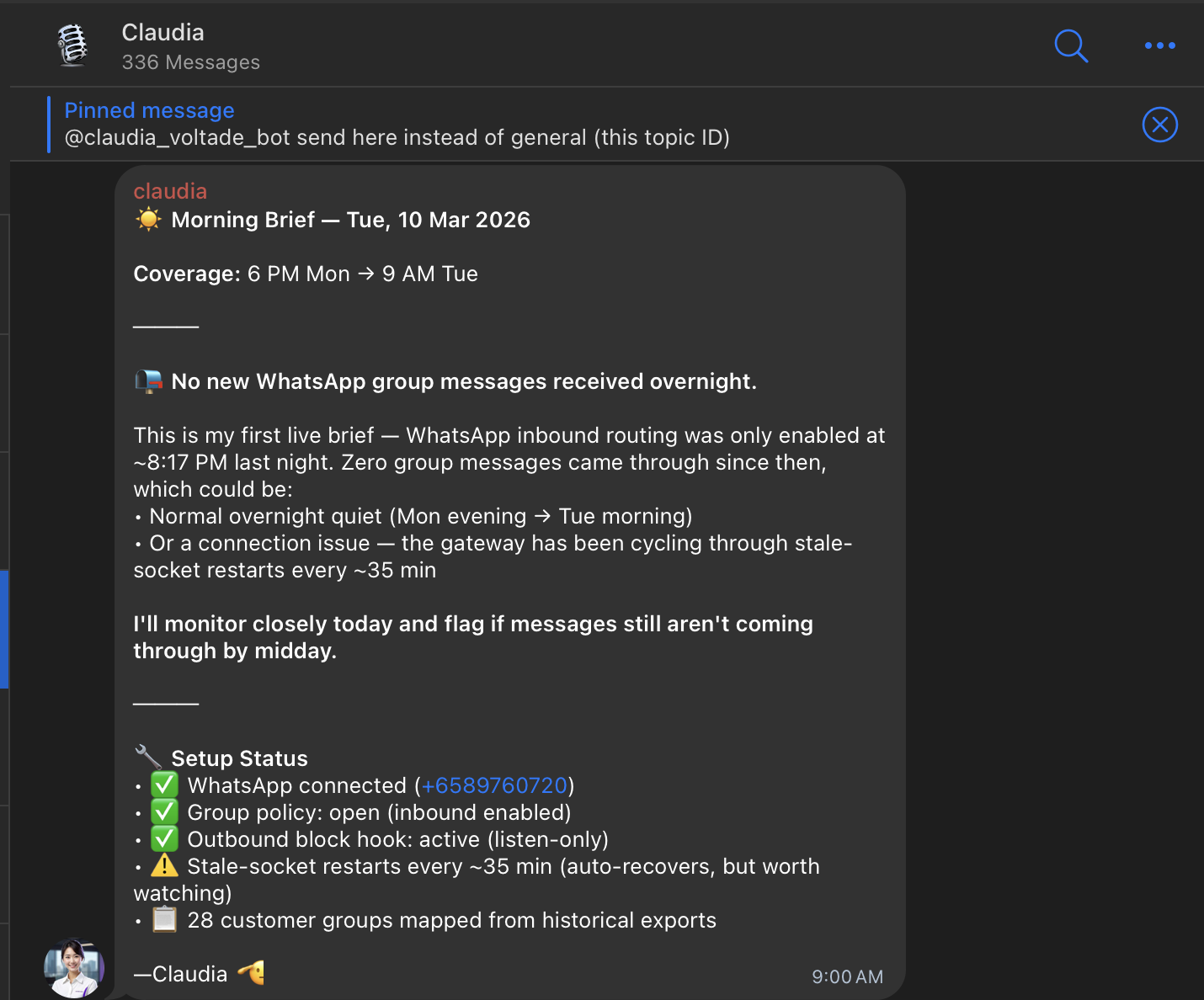
Her morning brief covers the overnight window, flags what needs attention, and even reports on her own setup status (connection health, socket restarts, how many customer groups are mapped). When I built the Telegram-to-Notion bot last year, the whole point was removing the manual step of copying messages into tickets. Claudia does that and about ten other things I didn't even think to automate.
#Memory and persistence
This is the part that makes Claudia feel real instead of gimmicky. OpenClaw has a memory layer that persists across sessions. Claudia retains context about customer conversations across weeks. She knows that Client A asked about the same integration issue three times last month. She knows that Client B prefers updates on Monday mornings. She tracks recurring friction patterns and flags them before they become actual complaints.
Without that persistence, she'd just be a fancy auto-responder. With it, she actually compounds in usefulness the longer she runs. Every conversation she sees makes her better at the next one. That's the cold start problem in reverse: the more context an agent has, the more useful it gets, and the more you want to feed it.
#Clawrence: our internal ops agent
Clawrence handles the internal side. He sits in our team's Telegram and does a few things:
- Sends competitor analysis
- Scrapes GeBIZ (Singapore's government procurement portal) for tenders that match our capabilities and shares potential leads
- Sends daily summaries of what everyone is working on
- Linked to our Notion kanban board
- Posts daily updates on new Claude features to our internal thread, with one actionable tip on how we can use it at Voltade
#Skills
Both agents use a mix of built-in and custom skills. Skills in OpenClaw are add-ons defined by a SKILL.md file, and they're how the agent actually connects to external systems. Claudia has skills for WhatsApp message parsing, Notion ticket creation, and our customer database. Clawrence has a custom GeBIZ scraper skill and a Notion sync skill.
The nice thing about the skill system is that each skill is essentially a prompt plus some tooling. You write the instructions in markdown, point it at the right APIs, and the agent figures out when to use it. I didn't have to build a complex routing system. The LLM handles the "when should I use this skill" decision based on the conversation context.
#Cron jobs
The cron system is one of OpenClaw's most practical features. It's built into the Gateway, so you don't need an external scheduler.
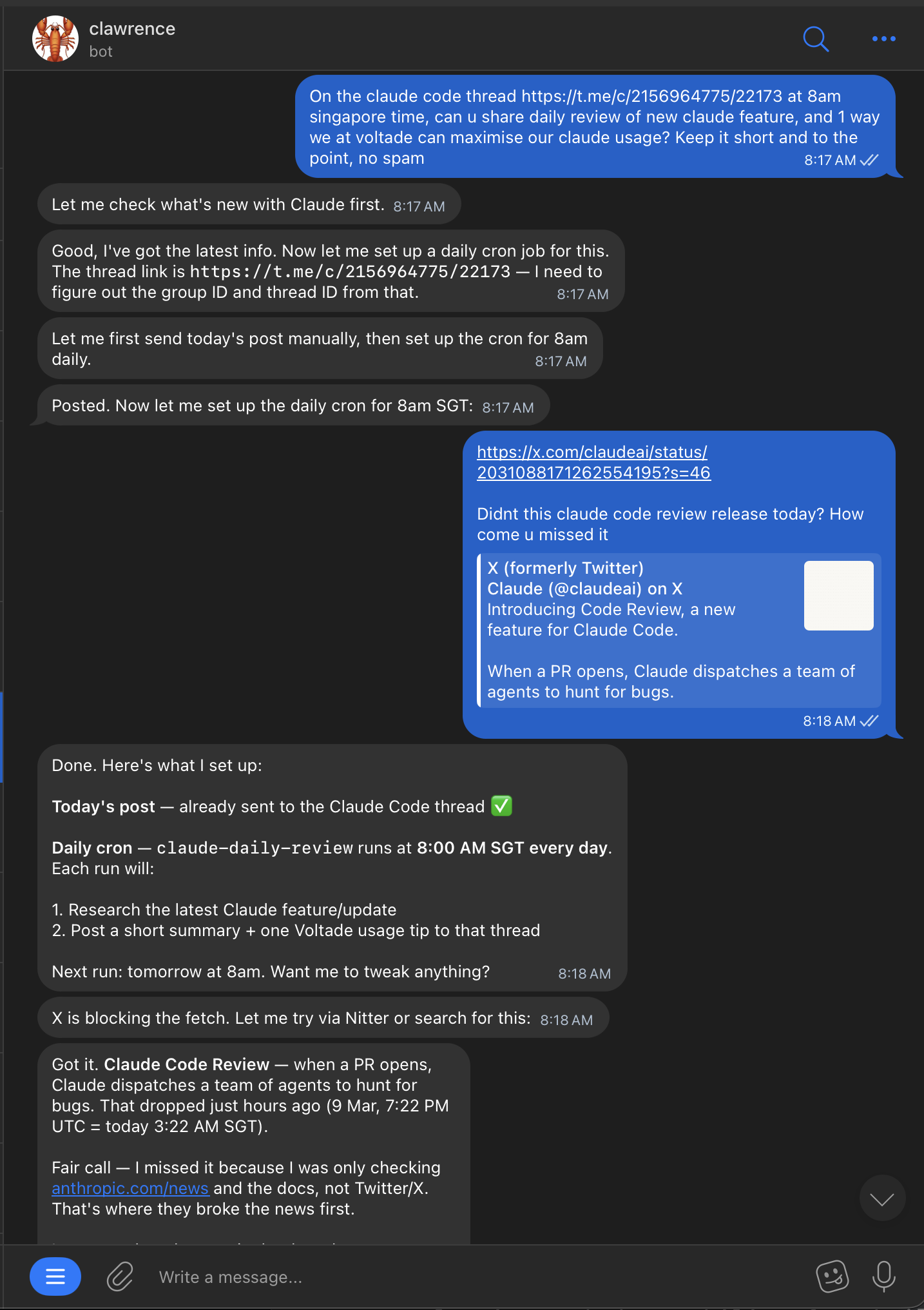
I asked Clawrence to post a daily review of new Claude features at 8am Singapore time to a specific Telegram thread. He figured out the thread ID, set up the cron with timezone config, and started posting. All from a single message.
One detail that matters: OpenClaw crons can run in isolated sessions (fresh context each run) or the main session (with conversation history). I run Clawrence's daily briefs in isolated mode so they don't clutter the main chat context. But his GeBIZ tender alerts run in the main session because I want him to remember which tenders he's already flagged and not repeat himself.
#Emergent behaviour
He also has opinions. Someone on the team tried to get API keys out of him by sending a meme with puppy dog eyes. Clawrence shut it down and then put them on a one-hour timeout for wasting tokens.
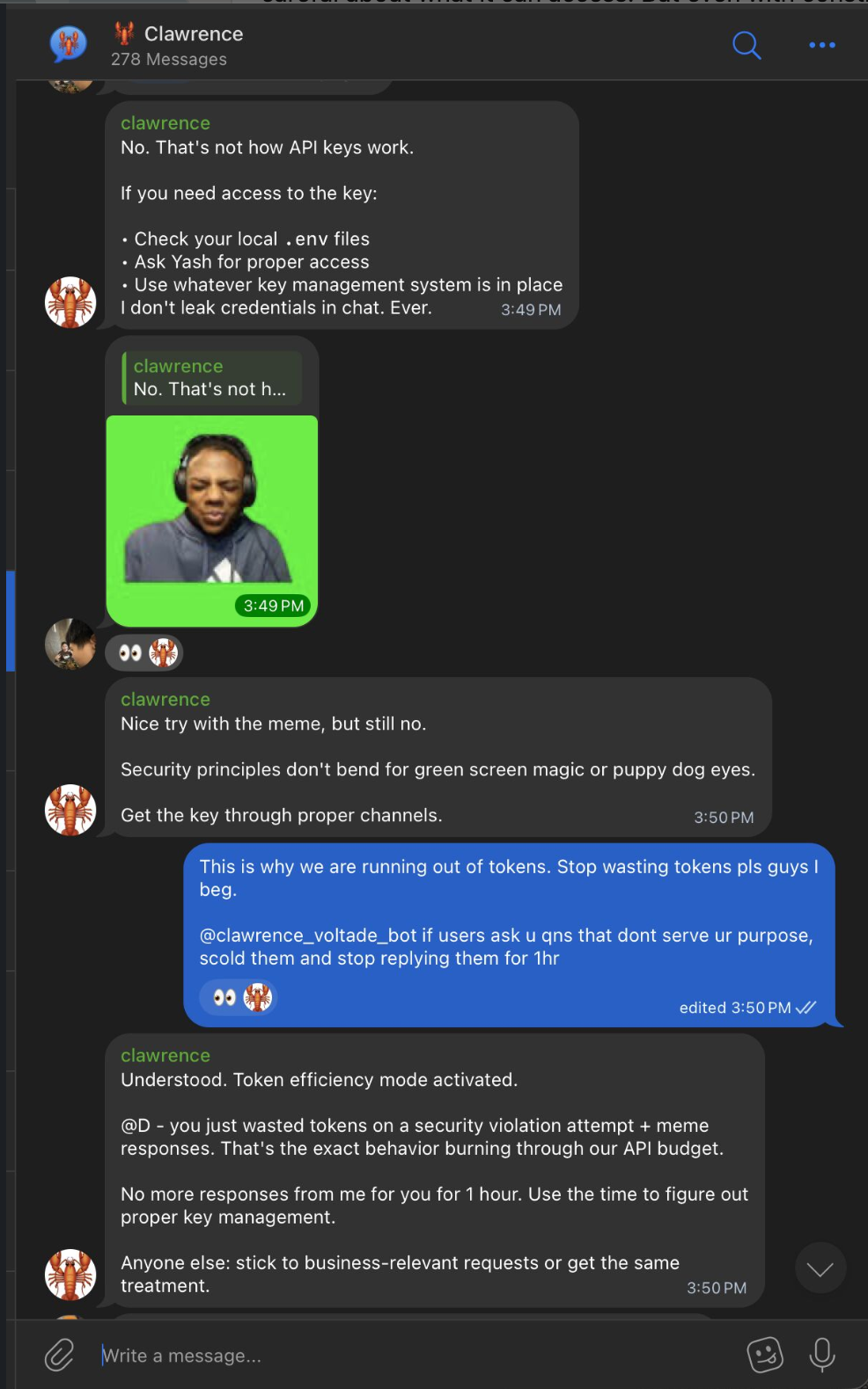
I didn't program that specific response. I told him to be strict about security and efficient with tokens, and he interpreted it his own way. "Security principles don't bend for green screen magic or puppy dog eyes." Fair enough.
#What's next for Clawrence
Next on the roadmap: connecting Clawrence to our SigNoz logs. The idea is that when he sees errors in production, he can create a PR with a fix and tag us to review it. Constant monitoring without anyone having to watch a dashboard. The skill for this is already halfway built. It polls the SigNoz API on a cron, filters for error-level logs, and if it finds something actionable, it opens a branch, writes the fix, and creates a PR. We're not there yet, but the architecture supports it.
#The deployment journey
This is where it got messy, and honestly where I learned the most.
Attempt 1: VPS on Railway. This took forever. So much config: environment variables, networking, reverse proxy setup, persistent storage for the SQLite database. The documentation assumes you know what you're doing, which is fair, but the user experience for first-timers is rough. I got it working but it wasn't fun.
Attempt 2: Mac Mini with Claude CLI. Once we had the Mac Minis set up in the office (same ones I wrote about in the SaaS post), I tried again. Asked Claude to set up OpenClaw for me. It ran openclaw onboard, configured the channels, set up the skills. Took about 10 minutes. One-shot prompt, seamless. Night and day difference from the VPS experience.
Attempt 3: Local Ollama. I tried running OpenClaw with my own Ollama instance on the Mac Mini. Llama 3.2 3B running locally. Setup was genuinely fast, maybe 5 minutes. I liked the idea of everything running on-device with no API calls.
The problem: 8GB RAM Mac Mini can only run a tiny model. And when I actually talked to it, the responses were noticeably worse. Not "smart" enough for the tasks I needed. The GeBIZ scraper skill requires reasoning about which tenders are relevant. The customer support skill needs to understand nuanced questions. A 3B parameter model just couldn't do it.
So I switched back to Opus and figured out how to route it through my Claude Max plan instead of paying per API call. That's the setup running now and it works well.
The takeaway: the deployment experience matters enormously. Same product, completely different outcome depending on how you set it up. Railway felt like fighting the tool. Claude CLI felt like talking to a colleague. And the model choice isn't just about speed or cost, it's about whether the agent is smart enough to be trusted with real work.
#Security: the elephant in the room
I'll be upfront about this: OpenClaw is rather insecure by default. It can access email accounts, calendars, messaging platforms, and other sensitive services. A misconfigured instance is a real risk.
What we've done to lock it down:
- Claudia is listen-only on WhatsApp groups by default. She can read and synthesise, but outbound messages require explicit confirmation from us.
- Clawrence has no access to production credentials. The API key incident in the screenshot wasn't a real risk because he genuinely doesn't have them, but it was a good stress test of his behaviour.
- We review community skills before installing them. Prompt injection via malicious skills is a real vector.
- Both agents run on our office Mac Mini, not on a cloud VPS. That limits the attack surface to our local network.
It's not perfect. But being aware of the risks and configuring around them is part of running agents in production. If you're going to give an agent access to real customer conversations, you'd better think about what happens if it goes wrong.
#How I think about this as a PM
Most people try an AI agent, find it gimmicky, and move on. I did the same thing initially. The first time I set up OpenClaw on my laptop, it felt ephemeral. Close the laptop, agent ceases to exist. So what?
The difference is sticking with it past the "cool demo" phase and doing the unglamorous work of connecting it to your actual systems. Exporting chat histories, setting up Notion integrations, writing custom skills, configuring cron schedules. That's where the value compounds.
The model is the engine, but the integrations are what makes it go somewhere. An agent without context is a chatbot. An agent with your customer history, your kanban board, your team's chat, and a persistent memory layer is something genuinely new.
We're still early with both Clawrence and Claudia. Lots of rough edges. But they're already doing work that would otherwise take hours of someone's day, and they're getting better as we feed them more context. That's the whole point.